
Collabshow.com
Microsoft 365
SharePoint Days Slovenia 2013 Recap and Download Slides

Just finished up my sessions at SharePoint Days Slovenia and had an incredible time here with the people of the Balkans.

Pictured Above: Zlatan, Joel (me) and Branka the conference organizer, at one of beautiful lakes of Slovenia.

Above: Packed Keynote in Slovenia held in a resort area called Terme Olimia known for its hot springs and spas.
This hot springs resort is essentially a group of hotels connected through underground tunnels to health spas and even an underground night club. I’ve never been at a hot springs that had over a dozen different steam rooms, hot tubs, saunas, at different scents, temperatures, and cultural settings such as music, seating arrangements and wood to tile, to reclining and even stars on the ceiling. Incredibly relaxing. I definitely took advantage of getting to know some of the other speakers. This two day event was a great business retreat with a strong focus on SharePoint, Yammer, Office 365 and Azure.

Slovenian Speaker Dinner. Speakers from Sweden, LA, Bosnia & Herz., Croatia, Bulgaria, Switzerland, Slovenia and more…
I did a keynote session on Finding Business Value in Enterprise Social Networking. Essentially I built a business case around engagement a concept built around an annual poll that on engagement that Gallup does. They recently released their 2013 world wide report and found that only 13% of the world is engaged. The numbers are higher in Slovenia, but still a long way… which means huge opportunity to transform the business. You can view or download my slides on “Business Value in Enterprise Social” from SlideShare.net I had a break out session on The New Enhancements in SharePoint 2013 around Video and the Asset Library including the HTML5 player, the Silverlight streaming player, and many features including embedding video from youtube and embedding your SharePoint videos on other sites. I think we had more than half of the session in demo. Those slides on Video and SharePoint 2013 are here. With people from mostly from Slovenia, but also some surrounding area. This area is well served with a rich community. I had incredible time in this most beautiful region of the world. You really do get the best of the old world castles, churches and history and nature with lakes, mountains, falls, and caves.

Speakers gather for a final picture before the event closes down.
This cave system we toured with a few of the speakers. It’s 25+ KM of caves, 2KM train ride plus 2KM walk. It’s been visited by over 35 million visitors since it opened. It’s one of the best I’ve ever seen in the 30 plus caves I’ve explored.

If you missed the Slovenia event, it will be back next year, or in less than 2 weeks the SharePoint Adriatics event is happening in Zagreb, Croatia. I spoke at this amazing event last year. Downloads: Finding Business Value in Enterprise Social (Yammer) What’s New in SharePoint 2013 Video and Digital Enhancements and Asset Library
Yammer is SharePoint and 5 Additional SharePoint Roadmap Insights for SharePoint 2014 and Beyond…
I had some fascinating insights from conversations at working social that i feel should not go unmentioned. Some of you may just need these insights.
1. I had a conversation with a Microsoft employee in New York office. I asked him point blank. How are you dealing with the focus on Office 365 and Yammer focus with less and less focus on SharePoint? Don’t your customers feel neglected? His witty response… “Yammer is SharePoint.” I think there was more to his statement which is why I just had to share it. The big bet on Yammer really is as big as that statement.
2. One theme that needs to be start taken literally is Cloud First. SharePoint on-premises is NOT dead. Here’s the future and current world picture for you… Features are first released to Office365, and then rolled out to the on premises version of SharePoint. I think we’ve heard annual on-premises releases at least referenced a couple of times. I don’t know if we call those versions, patches, or updates.
3. Features are released via an iterative approach. The more you understand how the yammer team has been working for years, the more you’ll understand what the future SharePoint/Office 365 team looks like.
4. SharePoint Future Roadmap will look more like the pattern of the yammer roadmap. When yammer was acquired one of the attractive things was the iterative cloud development model. In the past SharePoint was a 3+ year roadmap. We knew what would happen years out. Now we can assume more of a yammer style roadmap with 6 months of features that may change based on how a feature is used. You could easily say that even the product team does NOT know what SharePoint will look like in 3 years much much less than they did previously. It may never make it into the on-premises version based on how it is used and how it is received. Product planning is turned upside down and on its head.
5. To understand the SharePoint 2014 roadmap, simply look at what is happening in Office 365 and yammer and you’ll get some great insights. For example look at sharing in SkyDrive Pro optimizations, yammer newsfeed integration optimizations, and emphasis on the app marketplace. Getting to the cloud and hybrid are critical, so those will be major emphasis. Those are critical for online will eventually make their way into the product.
6. Office is the big brand and yammer is a product glue across all of the suite from SharePoint Online to Lync, Skype and all of the Office Web Apps and in the various clients on a variety of devices. You’ll continue to see more and more integration. Yammer is the big bet. Social is the big bet. Office 365 is the biggest bet and it’s going to be more and more pervasive and those bets will feel like a wave that first crests online and then brings fruit to the on-premises versions in subsequent waves. I think you’ll hear less and less about “SharePoint” as a brand as Office 365 brand gets stronger. Microsoft is all about Devices and Services. The more quickly we understand that, the faster we’ll understand the positioning.
Want a detailed roadmap? It’s going to be shared at the SharePoint Conference #SPC 2014! I’ll be there… see you there! Check out the existing tracks and sessions and you can see… it really is about roadmap with more detail about on-premises SharePoint.
Note: I’m not breaking any NDA in sharing these insights…
SharePoint Outer Limits: SharePoint 2013 & Office 365 File Library List Limits
A Spooky Halloween Post for you…
Office 365 really has made some impact to how we look at setting limits to support larger files, more sites, larger videos, and more file types. I felt it was important to revisit these classic file and folder restrictions. There appear to be so many random blog posts, KB articles, and TechNet articles, and MSDN articles. I decided I’d try to put the data all in one place. Note this is subject to change, so be sure to verify anything you read here.
I highly recommend architects start planning for a minimum of 5GB My Sites and Sky Drive Pro. We really need to start planning for 25GB SkyDrive Pro on-premises to compete with the improvements in the online services in order to compete with the online service. If you’re going to do this… seriously consider external storage systems. There are some great very cheap solutions.
Office 365 limits to SharePoint Online & SkyDrive Pro:
- Single file upload: 2 GB and expanded support for a broader range of file types. (increased file upload limit from 250MB and is by default 50MB on-premises often increased by admins to 100 or 200MB)
- # of total Site collections per tenant: 10,000 and list lookup threshold to 12 lookups. (was 3,000)
- File retention: 90 day recycle bin retention duration with turning versioning on by default for new SkyDrive Pro libraries. (by default 30 days on-premises with versioning off)
Notes:
“We just significantly increased the default SkyDrive Pro storage per user, from 7 GB to 25 GB, with the ability to further increase to 50 GB or 100 GB. To complement this, we’re also increasing the per file upload limit, from 250 MB to 2 GB. Users will now be able to upload and share larger files like CAD drawings, video files, larger project documents and more-both to their personal SkyDrive Pro and to team site document libraries. And it is possible to upload more than one file at a time via drag and drop, the standard file upload dialog box or via SkyDrive Pro Sync for Windows.”
SharePoint Online Blocked File Types
Blocked Files Updated:
SharePoint Online now accepts a broader range of file types, specifically .exe and .dll. See the list below.
Blocked file types for SharePoint Online Note this is a much smaller list than on-premises listed at the bottom of this post.
FYI: The updated 10/31/2013 reduced list of blocked file types cannot be changed for a SharePoint Online site.
| FILE EXTENSION | FILE TYPE |
| .ashx | ASP.NET Web handler file. Web handlers are software modules that handle raw HTTP requests received by ASP.NET. |
| .asmx | ASP.NET Web Services source file |
| .asp | Active Server Pages |
| .aspq | Active Server Pages |
| .axd | ASP.NET source file |
| .cshtm | ASP.NET web page |
| .chtml | ASP.NET web page |
| .json | JavaScript Object Notation file |
| .rem | Blackberry Encrypted Data file |
| .shtm | HTML file that contains server-side directives |
| .shtml | HTML file that contains server-side directives |
| .soap | Simple Object Access Protocol file |
| .stm | HTML file that contains server-side directives |
| .svc | Windows Communication Foundation (WCF) service file |
| .vbhtm | ASP.NET Razor web page |
| .vbhtml | ASP.NET Razor web page |
| .xamlx | Visual Studio Workflow service file |
| FEATURE | DESCRIPTION |
| Storage per user (contributes to total storage base of tenant) | 500 megabytes (MB) per subscribed user. |
| Site collection quota limit | Up to 100 GB per site collection.SharePoint admins can set storage limits for site collections and sites. The minimum storage allocation per site collection is 24MB. |
| Total available tenant storage | 10 GB + 500 MB per user.For example, if you have 10 users, the base storage allocation is 15 GB (10 GB + 500 MB * 10 users).Up to a maximum of 100 GB. Additional storage for Small Business plans is not yet available. |
| Personal site storage | 25 GB per user, as soon as provisioned.This amount is counted separately, and does not add to or subtract from the overall storage allocation for a tenant. Personal site storage applies to a user’s SkyDrive Pro library and personal newsfeed. For more information, see Additional information about SkyDrive Pro limits. |
| Public Website storage default | 5 GBA SharePoint admin can allocate up to 100 GB (the limit for a site collection). |
| File upload limit | 2 GB per file. |
| Number of users | 1 – 25 users |
| Maximum number of external users invitees | Up to 500 unique external users in the directory (external users who have accepted sharing invitations).What is an external user? |
“When reviewing the information on the previous table, remember that the base storage limits for Office 365 for Small Business (10 GB + 500 MB per subscribed user) will affect some of these values. For example, although SharePoint Online for Small Business imposes a limit of 100 GB per site collection, your particular tenant might not have enough storage available to contain a site collection of 100 GB.”
Site, Folder and File Name Restrictions
KB Article 905231 I’ve added some additional symbols and recommendations.
- Site Names
- Not Allowed: | # { } % & <TAB>” ~ + / : * ? ” < >
- Avoid starting sites with an underscore (_) or with the period character.
- Site names can cause confusion and corruption if they have periods, apostrophes or commas
- They should not have consecutive periods or end with a period.
- You cannot use the period character at the end of a site name
- Many other symbols are not recommended such as $^()-_=+[]`! (other international currency symbols and international symbols should be avoided in site names, but some are more acceptable in file names. Ascii is preferred when possible.
- Folder Names and File Names
- Do not use: ” # % & * : < > ? / { | } ~
- File names cannot be longer than 128 characters
- Do not use the period character consecutively in the middle of a file name. For example, “file..name.docx” is invalid.
- You cannot use the period character at the end of a file name
- You cannot start a file name with the period character
- Many other symbols are not recommended such as $^()-_=+[]`! (other international currency symbols and international symbols should be avoided in site names, but some are more acceptable in file names. Ascii is preferred when possible.
- In addition, file names and folder names may not end with: (Many of these are international symbols)
- .files, _files , -Dateien , _fichiers , _bestanden , _file ,_archivos ,-filer,_tiedostot ,_pliki ,_soubory ,_elemei , _arquivos ,_dosyalar ,_datoteke ,_fitxers,_fails ,_bylos ,_fajlovi,_fitxategiak
Examples of Legal File Names
- AllItems.docx
- Dept_1234.doc
- Long.Name.With.Dots.txt
Examples of Illegal Site Names
- Intranet/sites/People & Process
- Intranet/sites/My Math is 10% Here
- Intranet/sites/_foobar
- Intranet/sites/#FAIL
- Intranet/sites/Jimmy+Bean
Examples of illegal file names:
- HailCæsar.wav.
- Wow…BadStuff.txt
- 揵.htm
- Roger&Hamerstein.mp3
- WhatsUp?.doc
Note that windows may let you save filenames that SharePoint won’t support uploading. Sometimes you’re even allowed to upload it through the explorer view, and it will block you from the web interface. If a file that’s uploaded prior to the file extension being blocked you will be unable to download the file.
File and Folder name lengths
- Link list items are restricted to 256 characters and will truncate links to SharePoint documents (or anything else) with lengths longer than this.
- When storing files the structure and files (entire path including sites, folders, and file name) cannot add up to more than 260 characters or they will see an error message or form validation error with the explanation around the URL length.
When using multi file upload interface: Make sure the total size of all your files is not greater than the upload limit set for your web application.
NOTE: This is now different for SharePoint 2013/SharePoint Online. Now you can drag and drop many files over the limit. The interface may time out, and a page refresh should reflect what was upgraded. A failure may or may not display depending on the interface timeout.
File Size Maximums
Max File Size Default: 50MB Maximum setting: 2GB (per file NOTE: 2GB is the new SkyDrive Pro limit)
List data: Max of 8kb of data
200 MB is what I recommend for most typical environments as a great compromise, but don’t recommend more than 500MB for most environments without External or Remote Blob storage.
(If you set it to 0 or 2047 MB, it will be the same as 2GB file.) Realistically a few hundred MB is really all you can get, unless you have fast LAN access. MS is now supporting 2GB. Be sure to do some testing before setting this as the limit in your on-premises environment.
NOTE: I understand that even if you use RBS or Remote Blob Storage and most third parties, you still can’t support files over 2GB, but you’ll have to check with your vendor.
Note:
Each Web Application contains a list of blocked file types that is based on file name extensions. For example, you can block files that have the .exe extension. By default, many file types are blocked, including file types that are treated as executable by Internet Explorer. Files, whose names include braces, (for example, filename.{doc}) are also blocked by default.
Blocked File Types SharePoint 2013
Here are a few file types I typically remove from the blocked file list below: URL, LNK, CHM, HLP (if you want you can make the blocked list consistent with the online list)
I often add .MP3, PST, OST, and sometimes MP4. Some will add .ZIP, but I recommend allowing the .zip, arj, rar, etc… file as a common mechanism for compressing lots of files into a single file.
On-Premises SharePoint 2013 Blocked File Types
| File name extension | File type |
| .ade | Microsoft Access project extension |
| .adp | Microsoft Access project |
| .app | Application file |
| .asa | ASP declarations file |
| .ashx | ASP.NET Web handler file. Web handlers are software modules that handle raw HTTP requests received by ASP.NET. |
| .asmx | ASP.NET Web Services source file |
| .asp | Active Server Pages |
| .bas | Microsoft Visual Basic class module |
| .bat | Batch file |
| .cdx | Compound index |
| .cer | Certificate file |
| .chm | Compiled HTML Help file |
| .class | Java class file |
| .cmd | Windows NT command script |
| .com | Microsoft MS-DOS program |
| .config | Configuration file |
| .cpl | Control Panel extension |
| .crt | Security certificate |
| .csh | Script file |
| .dll | Windows dynamic-link library |
| .exe | Program |
| .fxp | Microsoft Visual FoxPro compiled program |
| .hlp | Help file |
| .hta | HTML program |
| .htr | Script file |
| .htw | HTML document |
| .ida | Internet Information Services file |
| .idc | Internet database connector file |
| .idq | Internet data query file |
| .ins | Internet Naming Service |
| .isp | Internet Communication settings |
| .its | Internet Document Set file |
| .jse | JScript Encoded script file |
| .ksh | Korn Shell script file |
| .lnk | Shortcut |
| .mad | Shortcut |
| .maf | Shortcut |
| .mag | Shortcut |
| .mam | Shortcut |
| .maq | Shortcut |
| .mar | Shortcut |
| .mas | Microsoft Access stored procedure |
| .mat | Shortcut |
| .mau | Shortcut |
| .mav | Shortcut |
| .maw | Shortcut |
| .mda | Microsoft Access add-in program |
| .mdb | Microsoft Access program |
| .mde | Microsoft Access MDE database |
| .mdt | Microsoft Access data file |
| .mdw | Microsoft Access workgroup |
| .mdz | Microsoft Access wizard program |
| .msc | Microsoft Common Console document |
| .msh | Microsoft Agent script helper |
| .msh1 | Microsoft Agent script helper |
| .msh1xml | Microsoft Agent script helper |
| .msh2 | Microsoft Agent script helper |
| .msh2xml | Microsoft Agent script helper |
| .mshxml | Microsoft Agent script helper |
| .msi | Windows Installer package |
| .msp | Windows Installer update package file |
| .mst | Visual Test source files |
| .ops | Microsoft Office profile settings file |
| .pcd | Photo CD image or Microsoft Visual Test compiled script |
| .pif | Shortcut to MS-DOS program |
| .prf | System file |
| .prg | Program source file |
| .printer | Printer file |
| .pst | Microsoft Outlook personal folder file |
| .reg | Registration entries |
| .rem | ACT! database maintenance file |
| .scf | Windows Explorer command file |
| .scr | Screen saver |
| .sct | Script file |
| .shb | Windows shortcut |
| .shs | Shell Scrap object |
| .shtm | HTML file that contains server-side directives |
| .shtml | HTML file that contains server-side directives |
| .soap | Simple Object Access Protocol file |
| .stm | HTML file that contains server-side directives |
| .url | Uniform Resource Locator (Internet shortcut) |
| .vb | Microsoft Visual Basic Scripting Edition file |
| .vbe | VBScript Encoded Script file |
| .vbs | VBScript file |
| .ws | Windows Script file |
| .wsc | Windows Script Component |
| .wsf | Windows Script file |
| .wsh | Windows Script Host settings file |
Social Architecture for Yammer, Office 365 and SharePoint 2013

Yesterday, was joined by a couple hundred people on a fascinating webinar with AIIM and Microsoft. I introduced some new concepts around a social architecture including a new Information Architecture Pyramid for SharePoint architects or deployment planners. I’ve done a lot of whiteboarding in my day around governance. I hope this and the diagrams in the deck find their way into more social planning sessions. I’d love to hear your feedback.
Here’s an example of a hybrid SharePoint 2013, Office365 and yammer information architecture
Example Hybrid Social Architecture

In the migration to the cloud and as adoption increases those items that are mostly uncustomized are better candidates for the cloud. There are a number of considerations.
- Dev Assets/Customizations
- Data Sensitivity/Confidentiality
- Line of Business Integration
I see SkyDrive Pro, and the utility based team sites that really are quick and agile with little to no customizations as the first candidates to go to the cloud. As well yammer which is cloud based is also a great area to begin using the cloud for many businesses. Others may opt to use on premises for both social and personal storage.
I’ve found the Intranet portal itself is often the last to go to the cloud due to the high amount of integration, customizations. As well there may always be sensitive confidential data that is held on-premises in SharePoint.
Hybrid search in SharePoint 2013 does support providing a unified experience of results from both cloud and on-premises. There are a number of articles on technet for setting up authentication and configuring indexing.
There is a struggle for what should go where. I’ve included a few different options in the slides I presented yesterday in the AIIM webinar. I’ll be presenting an updated form of this slide deck in Amsterdam at SharePoint Connections as well as in Slovenia at the SharePoint Conference. Over the next couple of months I plan to share more thoughts on social compliance and in planning successful enterprise social networks stay tuned for more here on CollabShow.com.
You can download my slides for more detail:
SharePoint 2013 and Office 365: Collaboration, Cloud and Compliance
SharePoint is NOT Dead and even on-prem is alive and well!

Monty Python comes to mind… the classic black knight skit from the “Monty Python and The Holy Grail” movie with Office 365 as the white knight… “It’s merely a flesh wound.”
Right now it’s very popular to say SharePoint is dead. Seems like everyone is saying it, even though there has been no official announcement, in fact the opposite is true. SharePoint on-prem has got to be at least 80% if not 95% of current deployments from a licensing perspective and # of sites. I’ll let someone else do the math, but even the analysts own surveys back me up.
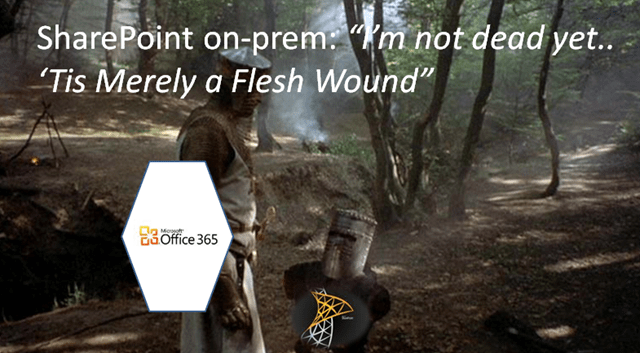
Amazing how many times people have mentioned in conversation, in email threads, in yammer discussions and blog posts discussions about the death of SharePoint on premise.
Let’s start with doubts…
1. I’m in a debate at SPTechcon and one of the speakers brings up in a public forum… This might be the last version of SharePoint… What?
2. On Yammer alone last week there were three independent posts questioning the end of SharePoint on premise including some from MVPs. Enough such that the latest post, people were exhausted by the topic and said… please read discussion on previous posts.
3. Our controversial friend Bjorn posts… In other news… SharePoint is Dead
4. At an Analyst Conference in a packed hall the biggest session of the day… Should Microsoft Kill SharePoint…
5. Microsoft IT’s own “all in” internal deployment of SharePoint going to the cloud have cast some doubts

Microsoft IT’s Practical Guide on Migrating to the Cloud
6. Lack of a broad TAP program
7. The end of MCM has broadcast doubts on the future of on prem.
8. CMSWire article – SharePoint is Dead long live Office 365.
While Microsoft seems to be waiting for the drumroll to use the loud speaker at SPC 14 in Vegas to reveal the big roadmap, there have been a lot of references to the continued life of SharePoint.
“When it comes to the cloud, we’re “all in,” but we’re also realistic. We have a large on-premises installed base that’s important to us, and we’re committed to future releases of the server.”
— Jared Spataro, Senior Director, Microsoft Office Division, “Yammer and Enterprise Social Roadmap Update” March 2013
As recent as this month, Bill Baer a product manager on the SharePoint Team wrote a blog post to help broadcast a message that more would be coming for On Premise. Read more at SharePoint for the Enterprise, On Premise, Cloud and everything in between. October 2013
“…we understand not all organizations can immediately realize the potential that comes with cloud computing, so we’ve invested in delivering solutions that support unique hybrid computing models, enabling customers to distribute their deployments across on-premises and the cloud.”
“We remain committed to delivering support and solutions for our customers whether in the cloud or on-premises, through cumulative updates, future service packs and content to ensure that wherever you have SharePoint deployed, behind the firewall or in the cloud, customers will continue to have the support they need to ensure the continued success and benefit of constant innovation.” Bill Baer, Sr. Product Manager, SharePoint Marketing Team
I keep telling folks they simply need to wait till SPC 14 to hear the roadmap be revealed. See the latest email from SPC. There are explicit sessions for on premise for roadmap and detail. Wondering if you saw your last update? Nope. See the IT track at SPC 14.
Developers who were upset that it was all about apps will be pleased to see a session on solutions (not dead yet).
SharePoint Conference Session Highlights Email:
IT Professional
- SharePoint on-prem, in the cloud and everything in between
- Get the latest on SharePoint 2013 on-premises updates
Developer
Developing on-premises solutions with an eye on the future
Will SharePoint ultimately go to the cloud? Christian Buckley said so in 2011 when responding to Death of SharePoint threats. Very likely… Some day, when we see feature parity, and concerns and security fears at bay. Microsoft would like to see more and more make its way to the cloud, but understand that’s a while off, and Microsoft plans to support SharePoint on premise needs for a long time to come.
Let’s let Microsoft work on integrating Yammer, fixing the Apps model, and making SharePoint Online get to feature parity or beyond with on premise before people start shouting “SharePoint On Premise is Dead!”

Top Posts & Pages


Recent Posts: Collabshow.com
I did it! Every Country in the World and Now writing book…

Best of Microsoft Ignite – 10 Key Takeaways

Business Critical Teams: 5 Steps to What You Should Do About it!

Success with Viva Topics

Viva Connections webinars for Executive engagement, Corp Comms and Front Line Workers

Darkweb, ransomware, and Human mistakes: recovery for Microsoft 365

The CEO’s Microsoft Teams calls keep dropping… What do you do?

Traveling Epic!


Interested in Webinar and Infographic?
