
Collabshow.com
Microsoft 365
5 Reasons OneDrive for Business on (SkyDrive Pro) Office 365 is Better Than Yours
There are many who are debating the move to Office 365, and one of the biggest reasons in your consideration should be SkyDrive Pro for your users. In my experience SDP is one of the first reasons to use the Microsoft cloud. It’s going to be less unusual for people to do the My Sites in the cloud and keep the Intranet on premises. Welcome to the world of cloud and hybrid cloud.
1. Size – Size matters when it comes to storage. In my last 5 conferences, I’ve polled the audience… Out of 1000 attendees the largest on premises deployment of SkyDrive Pro was 2GB. I was in the process of building a 5GB quota deployment of SkyDrive to attempt to match what users had with Dropbox when Microsoft announced the support for 25GB SkyDrive Pro in Office 365. It was at that point, I gave up. I was NOT going to try to compete with that size that would only work with an airline booking system to support data growth that had a TON of storage for flexibility. In addition to that you can even get up to 100GB SkyDrive Pro if you so desire. You should also compare your individual max size. Microsoft is now supporting much much larger files than you. They support a 2GB individual max file size. Here’s a good reference on the SharePoint Online limits you can compare yours with my SharePoint 2013 outer limits post where I compare online with the defaults and maximums and recommendations.
2. Mobile Apps work – The SkyDrive Pro app from Microsoft on iOS and Android ONLY works if you have an account with the Office 365 and in fact only exclusively works with SkyDrive Pro in Office365. (In addition the sharing features mentioned in #3 are exposed in the app.) That’s also the case with needing an account for Office365 for Android and iOS to get Office Mobile working. It should work with On Premises data once you’ve authenticated with Office 365, but I know some users who have had a challenge with anything but Office 365 due to firewall, auth, or who knows what. Since Office 365 is consistent, all of the third party solutions also work much better with Office 365 SkyDrive Pro including Colligo briefcase, harmon.ie mobile, SharePlus, etc… This means the security, offline, sync, search, yammer integration and social features that you want work the first time.
3. External Sharing – A feature NOT yet available in the Intranet on premises flavor of SharePoint is sharing. It’s built right into the Office 365 SkyDrive Pro. It enables scenarios that aren’t yet available on premises. The sharing allows you to share a document to an email. They don’t need to be part of the Office 365 network to receive the document. This is really important if you’re trying to convince your users to stop using dropbox for work documents.
4. Remote Access – While some companies may setup remote access to SharePoint, there are others that may require VPN or require many additional hops to gain access. Office365 provides a straight forward way to access the documents. There are single sign on solutions based on what the company has setup.
5. Yammer integration – The new ability to share from SkyDrive Pro directly to Yammer with the Office single sign on is pretty awesome. The integration is tighter without a LOT of work. I see the yammer integration as being a good reason to use Office 365 for SkyDrive.
Just because you agree doesn’t mean you have to put it all up there. There’s some great ways of doing just Yammer and MySites/SkyDrive Pro in Office 365 and integrating that with your on premises deployment, but that’s for another blog. You can point your my site host at Office 365 and in fact that’s how Microsoft IT (Microsoft’s own internal deployment) is doing it. They exclusively are using the SDP as the way to better handle individuals sharing files with external folks.
Yammer Roles & Permissions Drill Down
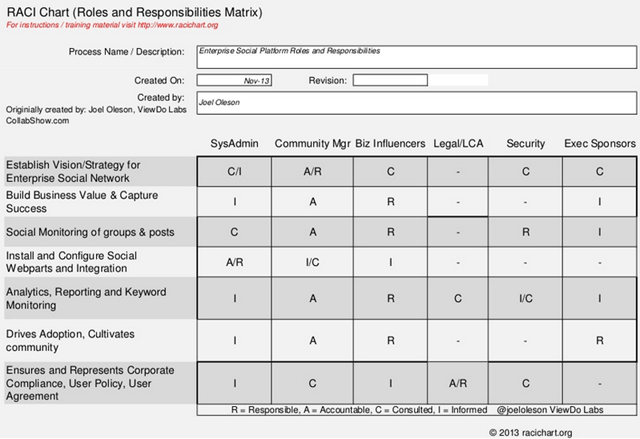
I’ve been privileged to work with a couple of very large freemium yammer networks and the taking it to the next level of making those successful enterprise paid networks. One of the biggest tasks in the project is working through the rights, roles and permissions. Getting governance, policies, and rights including the business buy in with skin in the game is so critical to successful deployment and adoption. The roles in yammer often are NOT Core IT based roles as marketing, sales, and other lines of business step up in cloud service management and line of business IT take on these roles. The critical nature of getting the right people in the right roles can mean success or failure. It can also dictate the culture of what’s ok on the network as often those with these rights are key in establishing rules, and groundwork for what comes later. Who should take on these community manager roles, and define the business roles such as yambassadors and what permissions they should have. What rights should help desk have in yammer if anything? I’ve put together some charts to bring all of these more granular rights into a single chart. I’ve tried to use the same language that yammer uses such as Network Admin, and Verified Admin. Let me also be clear not all networks are set up with the same configuration, but the abilities are consistent at the network administrator and verified administrator level. I’ve tried to work off of common settings and default.
Any network admin can configure or change the default email subscription settings. They can also add other admins. If this is an external network, the network admin can list it in the public directory of external networks.

Administrative Roles
Group Admin – The person who created the group but can also be assigned or reassigned. When a group admin leaves a network as the only admin, it will encourage someone else to take on the role. Group admins can delete items!
Network Admin (Also called Admin) – These are the most common and this is the most common role for managing the network. If a message needs to be removed in the main feed you must have at least this role.
Network Admins can choose which profile attributes are available. They can only choose from those which are already provided by Yammer. In the external network, for example, we don’t want to have personal information, like kids’ names and people’s birthdays.
Profile Choices

Verified Admin – This role is designed for the highest configuration. You should be VERY careful who gets this right, as they have god rights. A Verified Admin is the highest level of administrative control that can be assigned to a user. Both this role and the network admin role require a paid network. They can access all groups in the network. They can also delete any message and manage the integration configuration.
The normal network Admins will receive a notification if they do not have the correct permissions to perform an action:

Yammer Roles and Rights
I’ve assembled a list of scenarios by role. The x denotes that they have the ability. There are a few that may depend on the configuration of the network.


Group Admin
File and Image Attachments: Any number of files and/or images can be attached to any message or reply, with each file size limited to 5GB. By default, file attachments are enabled. Unchecking this setting disables this feature; however, existing attachments will not be affected.

Screenshot from SPYam, a Yammer community designed for the SharePoint Community http://yammer.com/spyam request an invite!
Yammer admins can customize branding, enable and disable features, integrate Yammer with other enterprise applications, manage users, monitor activity, export data, and more.
Newly appointed admins are designated Network Admins, and have restricted rights. To assign full administrative rights, click “Grant Verified Admin” after you’ve added them as admin. It’s a two-step process to grant someone verified admin and requires you be a verified admin to do so.
Verified Admins can also grant Verified Admin privileges to others, and can grant or revoke these privileges at any time. Please note that you cannot remove yourself as an admin. It requires another admin to do so. You should be aware that admins can remove an external network. So, you really do have to be careful to whom you give any network admin rights.
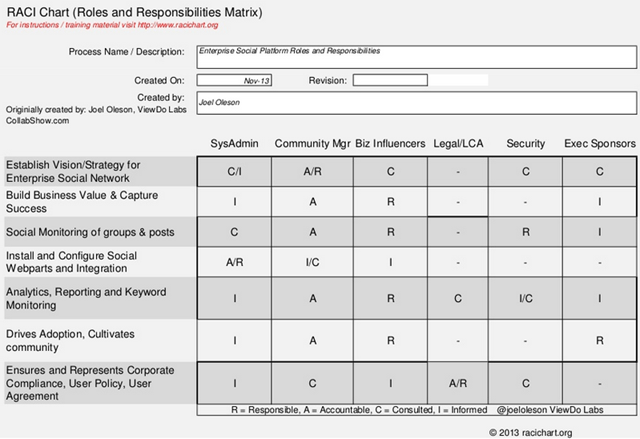
I put together this sample RACI chart that may also be helpful in planning your Yammer roles and responsibilities as you dig into your deployment. You’ll note that I don’t dig into who should be the netowrk and verified admin as that will vary widely from company to company. That deserves it’s own post.
RACI Chart of Common Yammer Roles
Yes, some of the data in this post has previously been shared on the ViewDo blog, but I’ve added additional insights here.
Here are a few additional Yammer resources:
Yammer Network Roles & Responsibilities
Yammer Enterprise RACI chart – a chart I put together (Slideshare.net applicable for most ESNs)
Integrate Yammer with SharePoint 2013
I hope to see more social sharing of experience from other bloggers… It surprises me a little there is few resources outside of what yammer has built.
2014 Predictions for SharePoint Office365 and Yammer
Let me be the first to welcome you to the future. I see a few changes coming in this next year. Here are a few that are top of mind. Welcome to 2014! The biggest theme is diversification.
1. SharePoint as a brand will take on some changes. These changes will emerge as more enterprise services are integrated and cloud is bigger investments. Microsoft will be making some WILD changes this next year with the new leader. This new leader will mention SharePoint many times in their welcome.
2. Top influencers in the community will DIVERSIFY their skills and what they are doing. You’ll see developers taking on Azure, you’ll see IT Pros taking on Virtualization and many taking on skills outside of the Microsoft areas as they broaden their skill sets to become not just Microsoft experts, but Industry experts. Look at what Andrew Connell is doing with WCM as an example.
3. SharePoint Partners will look to WPC and SPC14 for direction of what to do next. Many are freaked out by what little is seen today for partners in the cloud services of SharePoint and Office so, you’ll see many some building infrastructure in Azure and others going into Dynamics.
4. Consolidation! If you thought the Axceler, Idera, and SharePoint911 purchases were wild… hold on. There’s more to come.
5. Mobile will continue to be a major theme of 2014. With Responsive Web Design being a major Intranet redesign momentum as frameworks get adopted.
6. Cloud services will continue to be pounded on as those looking for basic services are happy and those looking for more customization are disappointed, but 2014 brings more flexibility surprises. Security continues to be misunderstood and distrust that stems from government big brother continues to plague migrations.
7. Yammer? Yammer is going to be popping up all over the place in Microsoft’s hosted services. Publish to yammer, including bringing the data streams into the activity stream will get much easier. Publishing a document from SharePoint Online to Yammer will be as simple as hitting the drop down if not more simple.
8. SharePoint Experts will feel some identity crisis as Microsoft determines what brands to promote in this new world. It will feel like Microsoft is downplaying SharePoint as it promotes the Office brand and Office 365 brand bigger and bigger. Microsoft will look to try to build Office 365 communities with yammer as a major component of that.
9. SharePoint Expert will seem too narrow in Consulting practice with Yammer and Dynamics needs as well as integration with Azure from a developer perspective. As a result, more and more consulting practices will have a hard time articulating this CLOUD architect role and CLOUD developer role which means API development and rich integration across HTML5, Azure, SharePoint, Yammer, and more. What you don’t know Exchange? How can you help us on our Office 365 roll out? You must learn the Exchange APIs, you must learn identity and so on. There is plenty of work, but you must diversify and train up! All this migration and rollout of new services provides a lot of work. SharePoint On Premises isn’t going away any time soon, but if that’s all you do, you will start to feel like a dinosaur if you don’t have a solid understanding of what happens first (updates that happen first in Office 365.)
10. Rise of the Enterprise Social Consultant. There will be more and more people who need to KNOW the Business and guide the business to the solutions it needs. These are not geeky roles, they require intimate knowledge of the business and can speak to the executives and clearly show how it will transform and optimize the processes. As IT continues to be downplayed, each of the lines of business will get more and more flexibility in defining it’s own needs in the cloud. Business agility and transformation through Office 365 with emphasis across Yammer, Lync, Exchange, SharePoint.
Top 10 Blog Legacy Posts from CollabShow.com and SharePoint Joel
End of Year is a great time for reflections… here’s a look at the Top 10 posts of the year (not in order). Look for my SharePoint 2014 Predictions in my next post. This list includes blog posts were written prior and after the move to collabshow.com across SharePoint 2013.
1. SharePoint Still Not Dead – On-Premises SharePoint is NOT Dead
2. SharePoint 2013 Analytics a Big Step Backward
3. Planning SharePoint Deployments with RACI (RACI Roles and Responsibilities Charts)
4. Do SharePoint Consultants Really Matter to SharePoint Success?
5. Yammer is SharePoint: Roadmap Insights for SharePoint in 2014 and Beyond
6. SharePoint 2013 Top 10 New Features
7. Is Interest in SharePoint Dropping?
8. SharePoint 2013 to 2007 Browser Support Matrix
9. Social Architecture & Social Compliance
10. SharePoint 2013 and Office 365 File Size Limits and list restrictions (The SharePoint 2010 Limits post is still very popular as well)
Merry Christmas and Happy Holidays #DCLights

I hope you and your family are having a great time together. This time of year in the United States and much of the Western world is Christmas, Hanukah, and is a season of spending time with family and friends. This year I got the opportunity to gather the SharePoint Community influencers in the DC Area and with the help of ViewDo Labs, we were able to gather for dinner and tour the National Zoo lights, the Capital lights and National Christmas tree.
From my home to yours… May your home be filled with PEACE, HOPE and LOVE this Holiday Season!


National Zoo Lights

Our Christmas Sleigh! Thanks ViewDo Labs!

Top Posts & Pages


Recent Posts: Collabshow.com
I did it! Every Country in the World and Now writing book…

Best of Microsoft Ignite – 10 Key Takeaways

Business Critical Teams: 5 Steps to What You Should Do About it!

Success with Viva Topics

Viva Connections webinars for Executive engagement, Corp Comms and Front Line Workers

Darkweb, ransomware, and Human mistakes: recovery for Microsoft 365

The CEO’s Microsoft Teams calls keep dropping… What do you do?

Traveling Epic!


Interested in Webinar and Infographic?
