
Collabshow.com
Microsoft 365
Next version of SharePoint in 2015 and other things I learned at SharePoint Conference #SPC14

There are a few things that I learned from SPC. First off many saw this as a non launch year. After day 1 I was so overloaded with announcements that I couldn’t keep up with them. I was trying to tweet every announcement I came across, and after dozens of tweets I realized I was missing many as the track keynotes each contained more announcements, and I’ll have a lot of work to do to dig into those. I plan to make a series that dive into the various areas, but there are some big takeaways both subtle themes and messages that while they may not be pointed out directly, there are key insights to gain. For simplicity I’m going to give you a list of 5 key biggest takeaways from the SharePoint Conference #SPC14. I’ll be doing a further drill down on the big 5 social features that were announced on the ViewDo Labs Blog. So this blog serves as the overview. I really should give the low down on the parties, hikes, dam, forts, and kareoke, but much of that is already on Facebook and twitter @joeloleson. AvePoint Red Party didn’t disappoint great energy and some of the best music and dancing of the year, and the Metalogix party was pretty good as well (until they wouldn’t let us dance on the platforms… come on that’s what we do!), but the best club on the strip was Hakkasan. After the speaker party, all of the speakers had access to the after event and Fergie DJ was incredible passion and energy and the club was the best on the strip. You want more on the parties and social? Let me know I could easily do a few pages with photos on that.

Lots of social announcements as well. Chris Johnson and Jeremy Thake are headed to Redmond to work for Arpan Shah at Microsoft on a special team (Devs, if you’re not convinced about dev’ing with the cloud, they will get you there… No doubt.) Andrew Connell was named the #1 Influencer this year by an independent study. Congrats to AC, in my book he’s always been one of the biggest influencers. His books, blog, and tweets and classes have been bringing up the education of the community for many years.
1. Office 365 & Yammer will be the focus and continue to get significant updates over the next year. While a few of us hoped to get real concrete info on the next version of SharePoint on premises, the message was… the next release will be in 2015. While I almost heard a groan, as many of us were hoping to see previews of the new version, I think the pregnant pause of not hearing anything significant about the next release other than the fact that it will continue to support server solutions.
2. Service Pack 1 included a significant switch to support hybrid OneDrive and Yammer. You could say the most significant announcement for On Premises customers was in the announcement and demo of the simple control to point at your yammer and or One Drive environment. Essentially on a single page designed like a wizard, you can hook up your yammer environment so it seemlessly integrates into Office 365. Additional yammer enhancements are on their way to support cross navigation between Office 365 and yammer making it simple for users. The new OneDrive license with Office 365 allows one to start with a simple start of just OneDrive. I like to think of it as dipping your toe in the water. OneDrive has great sharing capabilities that help it compete with Dropbox and additional announcements for OneDrive including a new API for building solutions against it, and significant announcements with support for MAC and iOS.
3. Office 365 has a new within tenant self service provisioning engine supporting custom branding and a javascript injection approach with API. Essentially supporting the idea of keeping branded sites and custom navigation. This can really be a huge boost in adoption preventing the out of the box exhaustion of having to start from scratch every time. Corporate branded sites and richer cloud APIs all around is a big step in the right direction.
4. Cloud APIs with a significant emphasis on a never give up approach to making Office 365 work. I refer you to the many new cloud and Office 365 APIs and Azure integration. Great example is the Office 365 Video portal. I heard from more than one developer they need to shift their toolset to developing in Azure. There were additional subtle conversations I had with Chris Johnson and Jeremy Thake which ended up being the biggest news. Having those guys both commit to joining a new Office 365 API like DPE team led by Arpan Shah really means business. That may have been the biggest announcement. These guys are some of the smartest dev evangelists who already have serious credibility in the community. There were more than a few sessions on these new APIs. Key takeaways from me a non dev… make sure you guys are ramping up on Agile, learning to work as a network, drinking from the Javascript fire hose. There are so many frameworks which can make your life easier. Client Object Models and Cloud development is NOT going away. You’ll need to understand how to build apps whether you are on premises or not. Even many on premises deployments will be using the improvements that happen to apps and the APIs. Don’t rely on me for all of the developer updates. Follow guys like Mark Anderson and check out his update on the #SPC14.
Other SPC Conference wrap ups I’d recommend:
Gus SPC Wrap up from old Jersey – Nice Overview
Fabian Williams shares his Conference Wrap up Day by day wrap up
Cimares Wrap up – more detail on dev and keynote announcements

5. InfoPath is dead. One of my favorite events of the conference was leading a funeral march through the exhibit hall and screaming InfoPath is dead, what will we do! You could say I had many motivations in leading this parade. One of those motivations was to ensure people not only had heard this news, but also to ensure that Microsoft was serious in positioning the messaging loud enough to the community to help us understand the direction of web forms. There was a session on the future of web forms, and you won’t understand what to build without digging into the new Access, new Excel surveys, and app forms. InfoPath is farm from out of use or end of life. We’ll see InfoPath use way beyond 2014, but most of the items in the product roadmap support a streamlined set of forms based on the user scenarios which start releasing this year. Expansion of OneDrive API. The ability to create Workflow App Packages as SharePoint apps and new workflow activation rules based on content types. Workflow is one of the larger considerations in any upgrade and migration project.
There are many solutions beyond this not simple technical roadmap diagram.

Jennifer Mason, while not a fan of the funeral, put together a CMSWire article that covers these Navigating the Microsoft Forms Roadmap. I’m not sold on InfoPath support on any future versions of SharePoint, but at least we know it works up through SharePoint 2013. I do see InfoPath support as a key consideration in many workflows and forms story. Both Nintex, K2, Bamboo, and a dozen other partners out there would love for you to consider their solutions as alternatives as well.
5. Enterprise social continues to be a huge investment with Yammer and Office 365. Organizational transformation through change and “working like a network” was a big theme in the social track. There were many announcements and a lot of positioning. If you think that Microsoft isn’t innovating you aren’t talking to the enterprise social team.
- Office Graph, which uses “signals from email, social conversations, documents, sites, instant messages, meetings, and more to map the relationships between the people and things.”
- Code-named Oslo, the first application of office Graph helps deliver personalized “insights” to help people get their jobs done, and lets users navigate, discover, and search for people and info across an organization.
- Groups – a new feature which grows out of a combination of team calendars, team mailboxes, team tasks and sites and conversations allowing users to work together and gather and share knowledge in Office 365. Takes the power of having email, sites, conversations and weaves these worlds together with new features.
I’m going to do a full post on this… lots to talk about…
Special thanks to the #ShareHike crew! I


10 Strategy Considerations for SharePoint 2013 Upgrade You’re likely to Miss

My session at SharePoint Conference is on Social Intranet strategy on Thursday at noon SPC 291 (Lando 4204-4306) at #SPC14. In the process, Shane Young was reaching out asking for best practices and considerations around upgrade. I put together this list as I was thinking about all the things people are likely to miss in their upgrade and deployment plans. To some this list may seem like things to get you distracted, but ultimately I think you need a wholistic strategy and answers to many of these things, even if the answer is… our plan is to wait until after upgrade. While the upgrade itself is pretty similar between a SharePoint 2010 and SharePoint 2013 with a few exceptions (mostly the services). I have found that SharePoint 2013 upgrades about communication and planning. The actual upgrade is really pretty simple technically.
1. SharePoint and Yammer Analytics are very weak and disappointing (worse than in 2010). Have a Plan. – They are worse than they were in 2010. Make sure you are well aware of your plan for web analytics. SharePoint 2013 Analytics A Big Step Backward. Also I would encourage you to look at ViewDo Labs analytics solution for Yammer that has an option for SharePoint relay to see a combined view. While I’m not as big on the SharePoint relay service, I am a big fan of the simple reports in the ViewPoint app for Yammer (Product Analysis: ViewDo Labs ViewPoint – Enterprise Social Analytics) which can help with monitoring and reporting. Cardiolog and WebTrends have put together analytics solutions for SharePoint. [Disclosure I do Evangelism for ViewDo Labs and I’ve done a review on Cardiolog, but I think the part about SharePoint and Yammer analytics both as lacking are pretty obvious.] Step 1 in touching your new design, plan to incorporate your analytics solution into your masterpage if you want awesome reporting. I know in a past life, it was our deep integration in our new masterpages with Omniture that finally got the business interested in what was really going on with the Intranet. As we rolled out the master pages and global navigation bar we called the feature bar across 100% of all of the SharePoint sites was a huge win for transparency into what was being used and how. We also finally got great global rollups on how people were searching and where they were navigating. Don’t discount analytics in your deployments of ESN, Social Intranets, or global SharePoint rollouts. You’ll need that data to answer where you should go next. 10 Yammer User Tips to Get Started
2. SharePoint Social is BIG in SharePoint 2013 have a plan – I encourage people to use the upgrade as an opportunity to pull in Yammer integration. I think it’s a mistake to roll out the SharePoint social features without ensuring you’re committed to 2 years at least if you get your users using it. It’s not fun for users to use SharePoint 2013 social features and then be told to go use yammer some 6 months or 1 year down the road. I’m totally cool with SharePoint social being a feed or being committed to it, but don’t go half way. I do support SharePoint 2013 social with yammer as an activity feed, but I simply find that the SharePoint feed is yet another place to post your microblog. Why confuse the users? Yammer is SharePoint and 5 Additional SharePoint Roadmap Insights for SharePoint 2014 and Beyond… Here are a few information architectural considerations Social Architecture for Yammer, Office 365 and SharePoint 2013 also a good time to freshen up on limits that support consolidation SharePoint Outer Limits: SharePoint 2013 & Office 365 File Library List Limits. Also consider the Newsgator social if you aren’t doing yammer NewsGator Reveals New Social Case Studies
3. Communities – Communities are a new site template that can definitely confuse users if they already have Yammer groups. There are ways of turning off that template. As cool as it is the community features in SharePoint 2013 were cool, but half baked. As a result I tell people either be serious about SharePoint social or turn it off. Some have embraced these new templates with reputation. I was reassured they would be supported going forward, but I remain skeptical about their future improvement. Is this the new blog that never get’s updated?
4. Architectural changes – First while many are simply going it’s all about the cloud, many are faced with hybrid considerations, or afraid of what’s next. SharePoint is NOT Dead and even on-prem is alive and well! Search is a major consideration in hybrid or on premises topologies and architecture. It’s more plastic and easier to scale out. Fast is baked into everything in SharePoint 2013. The Distributed cache service is a PAIN. It’s the new profile service in terms of getting it configured right. Search is very important, it needs to be crazy fast. Most should review requirements on search which may require additional hardware. Microsoft is recommending many customers to consolidate their farms so they can beef up search/indexing/crawling infrastructure.
5. Responsive Design – Responsive Web Design has changed the industry. Anyone who doesn’t educate themselves and SERIOUSLY investigate building a 2013 masterpage built to leverage the HTML5 and CSS improvements is shooting themselves in the foot. A major consideration in any design refresh. Don’t spend too much time on “Channels” in SharePoint 2013. How Quickly Can Responsive Web Design Make a Difference to Mobile Usage? Are You Designed To Take Advantage of Mobile? SharePoint and Enterprise Mobile – Transformational Yet Most Struggle and Don’t Know What To Do…
6. Mobile Support – There’s all the mobile apps for SharePoint, but those don’t work so well if the infrastructure isn’t setup and tested to support the mobile apps. You should seriously have a test and evaluation and security plan for firewall testing, remote user testing and mobile support for either MS mobile apps or one of the vendor solutions that add even more security considerations like harmon.ie mobile, Colligo, or Mobile Entrée or the many others that are way better than the simple apps MS provides (that are all new for SP 2013!).
7. Browser support – Older versions of Internet Explorer become non supported/not tested. IE 8 stops being supported on Office 365 for example in April of 2014. The improved browser support in SharePoint 2013 is worth shouting from the roof tops as to one of the big reasons why the business should get excited about the upgrade, let alone the multi file upload drag and drop capabilities from mac to chrome to safari and beyond. Here are some great references Seriously Time to Revisit Your Enterprise Browser Standards, SharePoint 2010 to 2013 Browser Comparison Report Card, Office 365 will No longer support Internet Explorer 8 after April 2014. If you’re looking for other things to tell the business for “Why upgrade” here’s a decent list: SharePoint 2013 Top 10 New Features
8. OneDrive for Business – Step 1. Admit you can’t do OneDrive better than MS for as cheap as they can. If you disagree with this statement, you’ve got some serious work to do in your planning for rolling out 10GB-100GB Drives for your users. I will tell you right now, this is the best toe in the water, personal extranet that you can buy from Microsoft. More reasons why at #SPC14 watch my blog for more info on the announcements, and I do mean announcements that will be happening this next week. 5 Reasons OneDrive for Business on (SkyDrive Pro) Office 365 is Better Than Yours
9. Office Web Apps – New server requirement means topology considerations. There is some considerations around licensing (read only is free). If you’re going to do read/write then you need licenses.
10. Dev App Model – One of the most significant impacts is this question of to support custom server solutions or to not. I believe upgrade time is a great time to evaluate what was used effectively and to consolidate and separate. Remove dependencies that are no longer needed. (This is an operating procedure that requires great skill… don’t take removing solutions lightly.) If you can remove all of the custom server solutions then you should be asking why you are not in the cloud. If you have many server solutions, you should question the pace and the value going into SP 2013 with so much custom and consider pushing the app model. As well, consider how Azure will fit into future development plans to reduce server footprint. From now on you should seriously consider keeping server footprint light and restricted to third parties that you really trust.
Revealing Details #MusicalFlashMob and #InfoPathFuneral at #SPC14

I’m pretty excited about #SPC14. I love the social gatherings that happen around the event. For me the SharePoint Conference is about networking. There is really no better opportunity to meet with SharePoint influencers around the world than at this event. Believe me. I love the events in Austrailia, New Zealand and the event coming up in Barcelona, but where else can you hang out with top influencers from Malaysia, Denmark, and Colombia all in one place. Sure there’s MVP summit, but that club is not for everyone.
Behind the scenes I’ve been collaborating with a team to organize and put together the plans for a couple of social community led, free opportunities.
Musical Flashmob
I’ve been debating how much information I should release. Reality is I want to make sure we get good participation and we get the audience that want to get involved and participate. We will be singing a SharePoint version of “Don’t Stop Believing!” The message is really around SharePoint and the struggle of this past year with the move to the cloud. Some have felt abandoned as they may have lost their jobs as the companies move their data to the cloud.

Image: Source: GLEE on Freebase, licensed under CC-BY
I’m still looking for more singers as part of the choir. No dancing required.
We will be holding a practice on Sunday afternoon. All of the details for practice, words to the song, and more will be sent to those who have signed up. We are also looking for people who don’t want to sing, but want to get involved. We have a percussion group to keep the beat and play air instruments. Great opportunities for air guitar in this song!
InfoPath Funeral
The InfoPath funeral is a great opportunity to gather with other SharePoint folks who were impacted both by the lack of direction by this team, or have built their careers on this software. We really want both to join us in saying good bye to InfoPath. I surely don’t want to wait till 2023 to say good bye. Join me as we carry the InfoPath coffin through the exhibit hall and Rest In Peace… InfoPath in the community area. Wearing black is optional.

We will be gathering at noon on Monday at the entrance to the exhibit hall. Signing up is not required, but for pall bearers please register so we can coordinate. We also will have face makeup for anyone interested in day of the dead facepainting.
Join the InfoPath Funeral Procession
(Image Credit: Yulia Mayorova via Shutterstock/davidford via iStock/Salon)
How’s the ESN heartbeat in your company?

I was recently reading the ViewDo Labs blog and came across John Puopolo’s post where he’s reaching out to the community… Tap Tap Tap is this thing on. I really saw it a bit as a doctor wanting to put the stethoscope out there to check the pulse… I want to address his questions, but also give some background on how important engagement is. You can’t just ask for it… The passion comes from the heart of the community that’s being built… it’s so much about momentum and passion and then the technology just needs to get out of the way.
In his intro he questions… “few of us are engaging in a meaningful way.”
In any community there’s an evolution. In the beginning it’s few few people carrying the burden of producing compelling content, but as everyone gets more comfortable things change. Now the stage is not just for the few, but for everyone. There will always be lurkers. On top of that there are many communities that are created, but there is no heart beat, no life. On the other hand there are communities of all sizes that very much have a pulse with a healthy beating heart. Who forms that inner circle that help create cohesiveness really really matter. Let me pick on one of my favorite communities… SPYAM. The Yammer network for the SharePoint, Office 365 and Yammer communities. It’s got great gravity and has great engagement based on my experience. The network nearly has 5000 members and great participation. Let me break it down for you.
Here are a few of my favorite messages posted and self selected by number of replies…
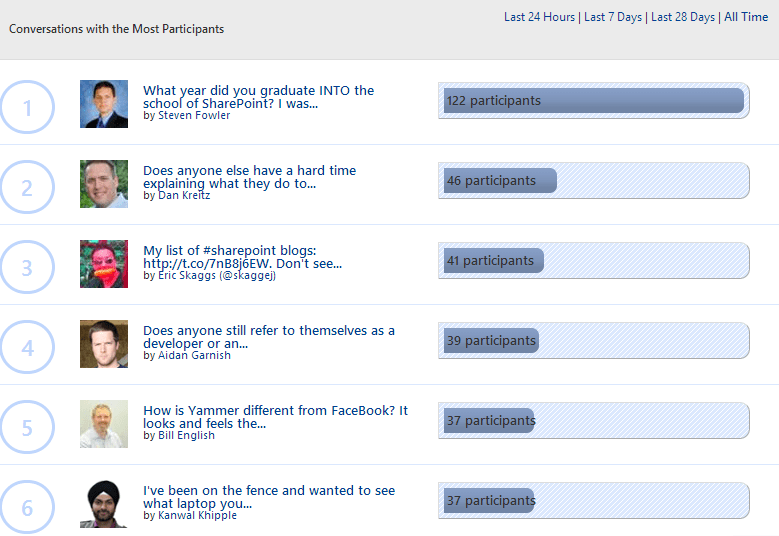
This illustrates these conversations bring in a lot of different perspectives and participation. They start with a question and those in the network chime in. The network has steadily grown for over the past year and a half. Conversations and driven by the community.
- Does your company offer an ESN?
Yes.
- Who champions the ESN in your company?
Traditionally I see it mostly as Marketing and Sales, (sometimes IT, but often they are also detractors) but there are distinct ambassadors that really have taken to it. So it is definitely individuals, but certain departments more than others.
- Do the executives use it to communicate effectively?
They are experimenting
- Is there a formal initiative in your company around enterprise social networking?
Semi formal. I never hear goals, but I do hear encouragement for incorporating it into our culture.
- What types of business decisions do you or your company hope to make based on ESN usage?
Speed of information. Answering questions that don’t fit in existing processes. Sharing news. Status updates.
- If your company offers an ESN, do you engage, actively, every day? If so, please share your story! If not, why not?
I think they expectation is that the individuals will set the pace, with notification integration, the engagement will grow.
- Are you working on a project where the ESN fosters collaboration? Is it effective? Why or why not?
Yes. Yammer helps us communicate and builds on what gets lost in email. The project team helps decide what should live in yammer… it really helps for retention and helps for ramp up for new team members.
- Is it “just easier” to use email? Is the ESN “just another” system to keep track of and “deal with?” or do you see benefits?
The benefits are there. In the beginning it can feel like just another collaboration or communication system, but the energy of the community and the knowledge that gets shared there is what makes the difference. Email suffers with a lot of weakness of conversations being lost, and really security is becoming a bigger and bigger problem with the status quo of email.
- Do you believe that if everyone used the ESN to maximum effect that your company would experience positive outcomes more frequently?
Yes, I believe it would speed up the information flow and all individuals who have another way to tap into the collective mind of the company. What better way is there to engage over distance?
Finding Apps the Social Way on Windows Phone with #AppSocial

I am taking another stab at Windows Phone, the first time around one of my complaints was finding good apps. The good news is, Windows has come a long ways and with the Lumia 1020 the hardware is ahead of the pack. What I love about Nokia’s approach is helping people find those apps that matter. The transition from Android and iPhone to Windows phone is much easier when you know what the equivalent apps are… With App Social you can find valuable resources in the community and people that are most followed that have great ideas and discoveries on apps that are being released every day. I’m always asking my friends what they are using. Now there’s an easy way to make lists and vote by following people and lists on relevant topics.

App Social Leaderboard… most follows this week
In App Social is an app for the community to help quickly locate apps based on popularity and share lists of apps allowing the community to vote up the good lists and good apps. The normal windows phone store definitely has some challenges when it comes to finding the right apps. For example there are over a dozen facebook apps and none are written by facebook (Zuck, I’m still waiting!). There are some that are better than others, and navigating the store it’s pretty tough knowing what is better than another and the ratings alone don’t do it.

What Facebook app?
My friends have since shared App Social and Windows Phone Central both of which can help you figure out what you’re missing out on.
This week I ran into a yammer employee who’s also been learning the best of Windows Phone. We were comparing apps and telling stories. Now with app social we can do this by simply creating lists, leaving little snips about why we like the apps and create themes around them. Much easier than just sending an email of a list of apps where I then have to search again for each new app and hope that I got the right one.

What are your favorite travel apps?
I’ve created a couple of lists so far. I’ve got a Bitcoin list, best of social apps, LDS apps and a list for Travel. I’m sure I’ll be adding more apps as I gain more experience and use more apps. You can follow me on App Social by simply looking for my username joeloleson or looking for my bitcoin list then finding me since it’s the first bitcoin list in app social.

Check out my lists of Windows Apps in App Social… and let me know if you’ve created any lists.
More info on App Social on the web:
http://facebook.com/appsocialstore
— This post was written as part of a partnership with Nokia, however all thought and opinions are mine.

Top Posts & Pages


Recent Posts: Collabshow.com
I did it! Every Country in the World and Now writing book…

Best of Microsoft Ignite – 10 Key Takeaways

Business Critical Teams: 5 Steps to What You Should Do About it!

Success with Viva Topics

Viva Connections webinars for Executive engagement, Corp Comms and Front Line Workers

Darkweb, ransomware, and Human mistakes: recovery for Microsoft 365

The CEO’s Microsoft Teams calls keep dropping… What do you do?

Traveling Epic!


Interested in Webinar and Infographic?
