
Collabshow.com
Microsoft 365
Office 365 & SharePoint Users: Wait or Upgrade to Windows 10?
SharePoint people around the world are asking themselves this question. Should I wait or should I upgrade? Windows 10 brings a lot of improvements to desktop productivity and Microsoft’s push to target Windows 10 far and wide led to millions upgrading on day 1 of it being available. Those using Office 365 and SharePoint have heard rumors that drag and drop doesn’t work on Microsoft Edge browser. Is that enough to hold up your upgrade plans? For some it already has been enough to scare them off. Some are looking for any reason to delay upgrade.
Five Windows 10 benefits for SharePoint and Office 365 users…
- Login improvements to Azure Active Directory for Office 365 – There is great potential for eliminating the continuous prompting for authentication for logging into Office 365. Most organizations using Office 365 with an on-premises Active Directory (AD) will synchronize their directory with Azure AD. These improvements alone can create a seemless experience for creating much richer desktop integration with OneDrive for business and quick seamless access to email. The great part of this is with Windows 10 login to you’ll join Azure AD to enable single sign-on (SSO) to Azure AD-integrated services. The ultimate goal of single sign on gets one step closer for the enterprise cloud with this component of Windows 10. Note it must be configured and when done properly this is typically setup during the install process of Windows 10. TechNet describes this as bringing the cloud to the desktop: “Choosing the first option (This Device Belongs To My Company) and clicking Next leads to a dialog box that prompts you to set up “your work or school PC.” That dialog box is intended for Azure Active Directory credentials, such as those linked to an Office 365 account.” As well just because you’re getting a good experience with the cloud doesn’t keep you from getting a decent Single Sign on for On Prem.
Windows 10 PC’s and tablets that are joined to Azure AD will also provide SSO to on-premises resources when connect to the corporate network and from anywhere with the Azure AD Application Proxy.

- Automatic MDM enrollment. Windows 10 PC’s and tablets can be automatically enrolled in an organizations device management solution including Office 365 Mobile Device Management including InTune as part of joining them to Azure AD. You can control the messaging, a logo to support enforcement with a friendly management experience, including free text such as contact info and phone numbers for support. There is also support for 3rd party MDMs.

- Windows 10 Unified Sync Client for OneDrive – Improvements to sync have only just begun with OneDrive and OneDrive for Business in Windows 10. Once you login with your MSAccount you’re really setting your hooks and configuring the synchronization settings. Configure it to sync as little or as much as you’d like. If you want to keep what is in the cloud, “in the cloud” then uncheck all the sync options. What you get in the box isn’t the last word on sync. I’ve already seen this on Jeff Teper’s list of Top priorities. (Don’t let me oversell this. This is still not yet what it should be, but this is an ongoing investment. I’ll let you know when I think this is fixed.)
- Recent Documents includes SharePoint and Office 365 docs – One of the improvements that begins in Windows 10 but also continues with Office 2016 is the concept that cloud doesn’t start outside of the desktop. Now documents you’ve worked on in the cloud will be in your recent documents in nearly all native apps. It gets even better in Outlook Mail when using attachments as they now have little indicators to show where they are coming from such as OneDrive for Business in SharePoint or Office 365. The cute little cloud is a nice touch and may definitely encourage users to be less scared about saving a document to SharePoint or OneDrive.
Figure: When attaching items SharePoint and OneDrive and OneDrive for Business all show up with the Cloud as part of the Icon.

- Touch and Responsive Apps – Tablet Office 2016 – If you want your users to get use to the new world of Office 2016, one of the best ways to introduce them to the new productivity features of Office is through Windows 10. Your older versions of Office work just fine on Windows 10, but the native windows productivity apps behave like the Office 2016 ones will. As well the tablet based touch version of Office 2016 has shipped with Windows 10…
Figure 2: Notice the menu on Word 2016. The ribbon and menu items try to continue to be useful even at very small resolution.

Taking Notes on MS Edge browser and putting them in OneNote and saving that to OneDrive for Business in Office 365 is probably one of my favorite reasons to upgrade, but the Edge experience on SharePoint is fine as a reader or casual browser, but not so great when working with SharePoint as a contributor. In my follow up post I’ll show you the real deal and pit Chrome against MS Edge, IE 11 and Firefox. On Windows 10 there is today a clear winner when using SharePoint or Office 365 and you may be surprised.
The jury is still out on whether you should upgrade. I think it is time for early adopters, but I also think Microsoft has some work to do to support Drag and Drop as well as Datagrid with MS Edge. Do that at a minimum and we’ll call the calvary to start pushing for Windows 10 upgrades. Otherwise you’ll have an exodus to Chrome. Microsoft also needs to get a better handle on ensuring IT is control of the patching situation. Impromptu updates can be a nightmare.
First Release: First look at MDM Mobile Device Management in Office 365
Office 365 Mobile Device Management is now available for early adopters and those tenants who have elected to opt into the First Release Program. I can’t tell you when you’ll get these features or if they are already released if you’re not already in the First release program. I’m not telling you to move up your tenant, but if you want to tell if you are or if you want to change, here you go:
How do I join First Release or get in Office 365 preview?
First Release program simply go to Admin > Service Settings > Update then switch it to “On”
This is not a beta program, just an early preview of new features. Note First Release in Office 365 primarily relates to SharePoint Online and Exchange Online.

There are other programs to get access to early bits such as the client or on premises servers:
Office 2016 Preview – For office 2016 client
Office Preview Programs – program span across the full family of Microsoft Office client, server and cloud services
Getting Started with Office 365 Mobile Device Management
You can tell if you have MDM features by going to the Office 365 Admin and selecting Mobile Devices in the left hand navigation. Click Get Started to kick it off.
Admin > Mobile Devices > Mobile Device Management

Looks like a simple wizard to get started, but in my experience this is something you need to do before you get started.

Check back in a few hours!?? After 15 minutes I checked and my hello kitty Office 365 Admin screen looked like this.

There are some recommendations from Microsoft on what to do next. You’ve completed Step 1 which didn’t do anything yet other than give you the ability to Manage them. Seems to me like EVERYONE should do that first step.
Step 2. Click “Manage Settings” on Mobile Device Management for Office 365
Detailed Steps for these are here: Manage Mobile Devices in Office 365
Required Steps: Next you can configure domains for MDM, then you can setup the Apple Push Notifications Certificate to manage the iPhone and iPads to connect. (Second isn’t required unless you’re using iOS devices)
Recommended Steps: Then consider Multifactor Auth options and security policies.
Secure and manage the mobile devices that connect to my organization?
Mobile devices like smartphones and tablets play a big part in helping people get their work done. Mobile Device Management for Office 365 helps make sure that your organization’s information is protected on these devices. Learn more
How to set up Mobile Device Management for Office 365
How to create policies to secure device access
Blacklist or Whitelist Users and Devices for Exchange based on Security Groups

Ok. Here’s the Richness of Options:
Mobile Device Security Policy

Then there are these additional options

The default settings are really pretty good. If you simply agree you’ll get this… Seriously if this is your first time, I suggest you not go past this, and at first only do this for a specific security group so you can tell you setup the APNs properly. There’s a lot of good reasons to roll this out slowly. Imagine how upset you’d be if you couldn’t get your email. These kinds of rollouts really should be connected with announcements to affected users AHEAD of TIME.

Why I Moved to San Diego and Joined Hershey Technologies
Making career and job decisions is hard. Most people involve God in decisions like this. It’s a big deal. After I left one of the best jobs at Microsoft, I really wanted to make a difference in the community. I feel like I’ve been able to do that, but the adventure was far from over. You rarely know the full story. Some day I should put together a behind the scenes book together that talks you through why I zigged instead of zagged.
In 2011, I moved to Salt Lake City, Utah to work for the LDS Church to run their Collaboration Environment. I had a fantastic time. I built an amazing team and met some incredibly talented people who could move mountains, mission accomplished and we really did. I hope you meet or get an opportunity to work with some of those people in this small community. In 2013, the church had 20,000 new volunteers they needed to accommodate (they changed the age of the missionaries from 19 to 18 for men and 21 to 19 for women) and the budgets needed to shift.) I was happy to have been part of an incredible amount of change at the church in the collaboration space. It was an incredible opportunity and one that was destiny. Some day you’ll have to ask me about my Jonah and the Whale experience when I was in Joffa and realized I needed to go work for the church.
SharePoint Team at the LDS Church

Not pictured. Our awesome interns.
My Contract with ViewDo Labs
After that I had the opportunity to work at a couple of startups. ViewDo Labs was a fun startup. Great people, exciting opportunites, and lots to learn. ViewDo was a contract position, that I evaluated and renewed up to 6 months until they went into sustainer mode and then took another step back… and I quote from the VDL blog, “Therefore, it is with a heavy heart that we announce that starting February 1st, ViewDo Labs will no longer support ViewPoint Enterprise. Unfortunately, the cost of running an analytics product is high and with dwindling usage, it is no longer in our best interest to sustain ViewPoint Enterprise.”
Startups Sometimes Don’t Work Out
Many know I spent some time with on Presales, Business Development, Marketing, and Management. Since the other places I spent some time are still in business let me not name names and share what happened. I was in a great position to join startups and lend them my abilities, but not all businesses succeed at first and not all opportunities are a good fit. These past couple of years have been trying as Microsoft has shifted it’s marketing muscle to the cloud.
- Was told “After this next check we won’t make payroll.” No one was getting a paycheck. That changed to… Only those billing will get paid for what they billed. I stuck around for a few weeks and worked on some deals, but ultimately found something more reliable. Still friends with those that are still there and wish them the best.
- Was told one thing going in, and the environment changed including losing my boss and restructure of the entire department. The person who hired me was no longer around to explain why I was hired and provide direction. The needs changed and we decided mutually that it was better if I look elsewhere. No burned bridges. I don’t believe in that. We live in a small community, so it’s important to keep good relationships with everyone. Still only wish these guys the best.
Why Move to California?
When I had the opportunity to move to California I took advantage of it. I was born in the bay area and my wife is from Southern California. I hadn’t lived in California since I was 5, but many summers we visit Southern or Northern California. While I grew up in Idaho and am extremely fond of the mountains, I have always wanted to live by the beach. That’s really been a big dream. I learned surfing up in Washington, but I need more practice.
A couple of summers ago, I did a southern California User Group Tour starting in San Diego to Orange County and Los Angeles. It was here I first met some of the Hershey Technologies people. I first met the SharePoint MVP Haaron Gonzales while speaking in Mexico City. I met Tom Castiglia when I joined the User Group committee and hung out while working on the Speaker Dinner for the SharePoint Saturday San Diego. I had some crazy ideas about fire dancers and hula dancers on the beach in San Diego. With his help we were able to pull it off. It pays to think big.

Everyone loves puppies this is pinky and stumpy our Chihuahua Dachshund mix – Chiweenies
I’m very excited about my new house and cute puppies. Just closed about a week ago. Oceanside, CA a San Diego suburb is my new home. I’m in a good place. Feeling Zen. My kids are in good schools and making good friends. Life is good.
Hershey Technologies
When I started looking for work based off some startup challenges at a previous place of employment that I don’t want to get into. I reached out to the User Group committee and asked for suggestions. It was there that I kicked up conversations with Tom. I was surprised to find out that Hershey Technologies has been working in the ECM space many years before SharePoint was even a concept. I went on the wayback machine and saw their site from 1997 (crazy!). They were supporting scanning, printing, faxing and data capture into ECM with Kofax and essentially doing software and hardware support since 1991! In all of the companies I’ve worked for I’ve never had someone celebrate a 20 year reunion, but that is not uncommon here at Hershey. (Honestly, I did join a Jeff Raikes going away bash, and he had put in 27 years at MS… 20 years more than mine. We had some great chats since he was leaving Microsoft at the same time I was.) Seems like half the team has worked here for 10+ years! What I found was while they are a small company, they aren’t exactly a startup. What I see is a family. Tom heads up the SharePoint and Office365 practice and Neal drives sales and the Kofax business with Arjay. Tom and Neal have been running the business very consistently for more than 20 years with serious reliability. Their clients love them. I felt something here that I really liked. They are all putting in serious effort and enjoying what they do. They take on hard challenges and work together. They supported my focus on community and in helping customers succeed. They’ve supported my ideas of around focus on adoption, governance, and in adding real business value.

Over the last couple of years I have encouraged people in IT to pivot their skills to ensure they aren’t left with skills that are out of date. Just like those who stick to the command line… STSADM really has become obsolete… you better learn scripting and powershell or you’re going to have a hard time administering SharePoint in an automated way. I’ve had a passion for community, social marketing, content marketing and marketing. The opportunity to own marketing for Hershey Technlogies has been an exciting proposition. Not only can I help provide direction around the Hershey XenDocs products, but I can step in and line up webinars, events, SEO, website content marketing. In fact I just launched the website http://hersheytech.com Ultimately I’m helping connect solutions with people who need help. I don’t really have to do any selling when I match the best solutions to the people who need it. There are customers who need help and I try to be there when they need me. I say, awareness is the biggest problem in the vendor space. If I can do more to help provide awareness around the tools we provide around legacy ECM migration to SharePoint, and data capture to SharePoint with Kofax and XenDocs. I can strengthen both my marketing skills and hone in on strategies that can help in any industry.
You can read more about Hershey Technologies.
FAQ – I’ve gotten some interesting questions while out at events. Here are a few questions and simple answers
Has your travel requirements caused problems with your employment?
No. Travel has never been a reason that’s made me leave. I do feel like I was travelling too much while I was at Dell Software (was known as Quest). They told me I was traveling more than I needed to, and it was true. I was giving myself more travel than I needed to. But in any of the startups travel was not an issue. I do love travel and I work out an agreement before I start work to set proper expectations around international events for both parties.
Why don’t you just go independent?
While I see huge satisfaction in building a business, I also see the commitment it requires and the sacrifices. I need more stability at home than what my own startup would require. I would be more willing to do it, but my wife isn’t as excited about the sacrifices it requires. So for both our sanity, I’m ok with making someone else profitable. I’ve done independent work, and I really don’t like the taxes, the lead time, dealing with collecting payments, accounting, and all that jazz. I have less headaches and stress while working for the man or the woman J
Why all these startups? Couldn’t you just go work for Google or Microsoft?
I did enjoy my 7 years at Microsoft and would consider working for Microsoft again. I’ve been approached by Google and Amazon, but I’m now enjoying my new life in San Diego. Going to work at HQ for a company in Silicon Valley while exciting isn’t in the plan for the near future. The commitment I’ve made to Hershey is solid. Hoping that things work out for them and me. I got a call from Microsoft a couple days after I joined. Sorry, too late.
Are your travel plans associated with the Church? Seems like you visit a lot of LDS temples.
I love seeing and visiting the LDS Temples doting the globe. There are 146 operating temples 13 under construction and 14 announced. I’ve visited over 65 different temples and it brings me peace where ever I am in the world when I see one. I’ve got others in the community taking photos of temples as well.

My daily commute takes me right near my favorite temple, the San Diego Temple, where I was married 20 years ago this August.
Are you going to be traveling less?
I still get opportunities to speak. I weigh those with work commitments. I have worked out an arrangement with work, where they support some of my international speaking, events and community building. So I will still be doing a fair bit of travel compared to most. Compared to what I have done, it should be similar. I am still on a quest to visit every country in the world, but it’s getting a lot harder and so it requires more planning and more visas.
What about independent work like product reviews and webinars with other vendors?
While I have reduced a lot of that, I still enjoy doing panels like the Enterprise Social panel I did last week with IT Unity and last month with Cosign and will be presenting at #SPBiz15 in a couple of days. I have written up some simple intros for Content Panda and Office365Mon in the last month. I am in touch with a few vendors that want to do joint webinars and product reviews. I’m always looking for community sponsored travel funds so I can reach farther places. I don’t ask Hershey to pay for my international conferences.
What events are you doing? Where can I see you?
I did SharePoint Saturday Silicon Valley a week or so ago, and plan to support another one in San Diego and Orange County with the right folks involved. My current plans will find me at the Iceland User group (Aug 1 – TBD), Modern Worksplace Summit in Oslo Norway, Slovenian SharePoint Conference, European SharePoint Conference in Sweden and 8th
Latin American Simposium in Santiago, Chile (we’re looking for sponsors).
I’m already looking at Algeria, China, Persia, Bangladesh, Sri Lanka and Brunei in 2016. If you’re associated with those SharePoint communities we need to start talking… I do have some contacts in those areas, but please reach out. Africa is always a target, I always find lots of things I can do to improve communities and support the people there. My email is joel.oleson @ gmail.com
Top 5 New SharePoint 2016 Features announced at Ignite
The Ignite conference gave us a taste of what is coming in the SharePoint 2016 features list… at least from an IT Pro perspective with some that hit end users. Not everyone was able to make it of course, so I wanted to share my list of top features most of which was shared during Bill Baer’s 9am session on Wed the morning after the AvePoint RED Party/Metalogix Best of Breed Awards and so I’m sure there were some who may have slept in. Lots of great stuff to get excited about… and hey this is just the start… Bill informed us that they haven’t really started yet on the UI. Public Beta in Q4, with public release (GA) sometime in Q2 of 2016.
1. Durable Links – Documents can be set to use Resource ID for the URLs. Redirect manager handles the inbound requests from guest links, external sharing, and SharePoint UI such as webparts, and handles them back to the user.

2. Compliance – DLP is the key term. Monitoring, and protection of data through deep analysis of content. Improved Auditing and protection across on premises and cloud.
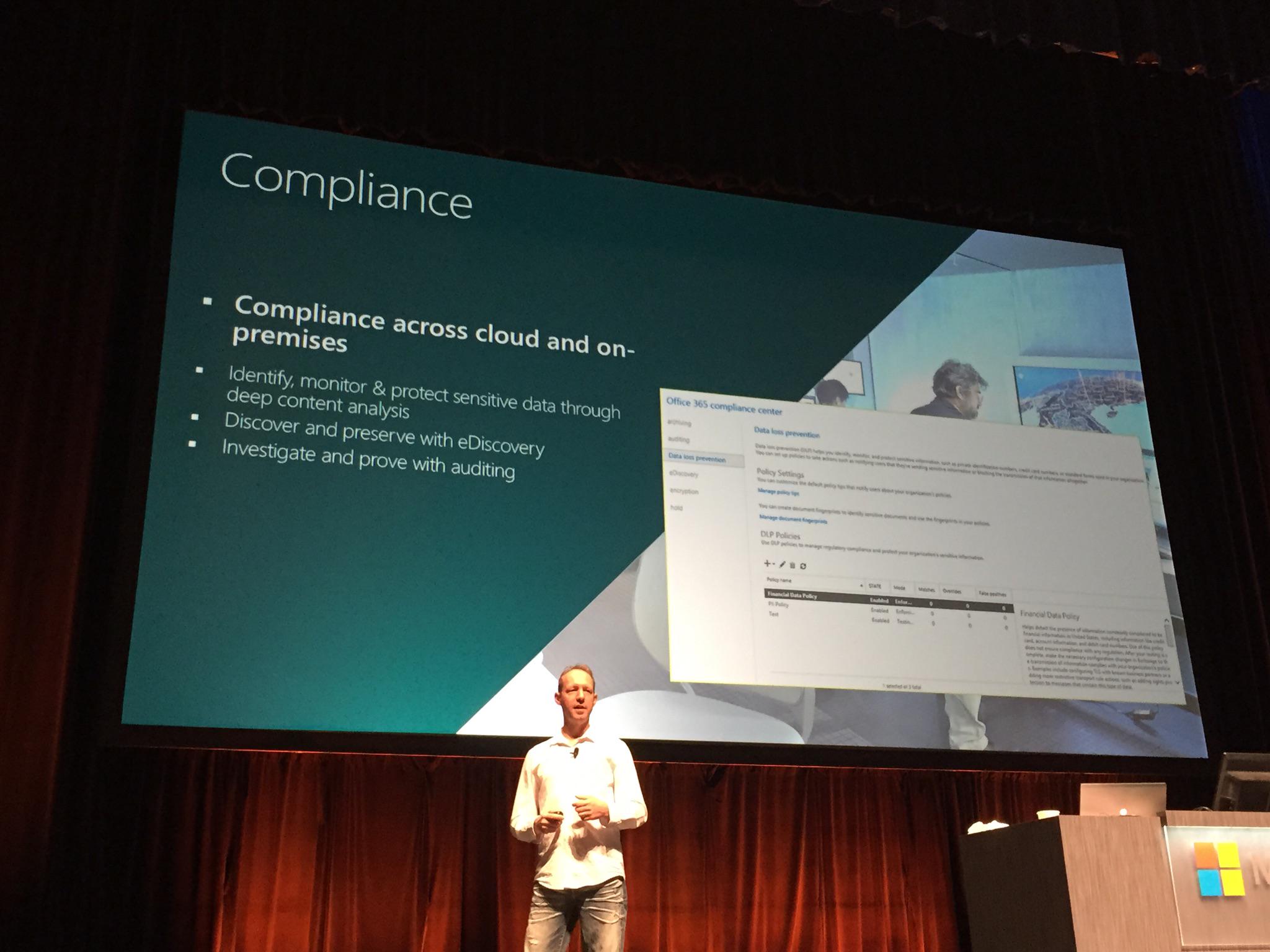
3. Increased Boundaries – List views increased, single file sizes up to 10GB, TB databases, and list thresholds… I think this one is going to matter for those environments where SharePoint is getting bigger and bigger and bigger.

4. Minimal patches with Zero Downtime – This was mentioned at Bill’s first session with Seth on Monday following the keynote. He talked about the hundreds of files that were changing per edition and per language pack and how massively unnecessary these patches were. The feature should increase reliability of the service, reduce the number of patches and impact with a goal of zero downtime. Better reliability and stability is the goal, but I still need to hear more to understand how this is possible. New insights with additional hooks on usage are planned, so you can potentially build additional health reports and get the metrics you need to build true 99.99 availability farms.
5. Hybrid Deployment Automation – While some may see this more as a Hybrid feature or a feature of the cloud, there are a lot of people who will be in the middle of a LONG migration plan to get to the cloud and hybrid ends up being a reality. This feature essentially simplifies what is today 15 pages of powershell commands and configuration steps and simplifies it into a wizard.
I’ve heard the complaints about how hard it is to setup… with SharePoint 2016, we’ll be able to count the clicks on one hand?
Now for some not so great news:
* Upgrade from 2010 will require users to migrate first to 2013 then to 2016 unless you use third party tools.
* SharePoint Server 2016 will require Windows Server 2012 R2 or Windows Server 10.
While I was hoping for more cool demos, there really wasn’t much to see. FPWeb hosted a very simple 2016 demo that wasn’t really worth spending much time with given the lack of UI improvements. The mobile improvements are of mention, but I’m still hoping they do more there.
[contextly_auto_sidebar id=”1EXgqi3VWos9zJnaIAlLJAHvg14UFigY”]
SharePoint 2013 Mobile App Device Support Matrix

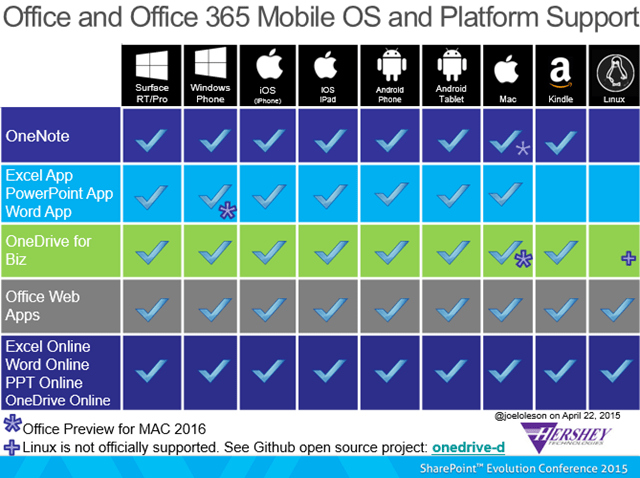
In preparing for my Mobile Enterprise Strategy Session in London, I put together two different mobile app support matrices. People want to see what works on what platform. None of this I’m calling Official. This is my experience and from my own testing. There may be bugs and you need to should also verify this yourself if you have any questions. If you disagree with anything please add in the comments so I can either update or you can make others aware.
If you want the full slides you can download them here: SharePoint 2013 Mobile Enterprise Strategy. Despite the fact that it says only says SharePoint on some of these images. This applies to SharePoint 2013 On Premises, Office Online, OneDrive, and Office 365. I’m sure MS would like to know what you use that is missing from apps they are targeting for your device.
Enjoy! Feel free to download this infographic “SharePoint 2013 Mobile App Platform Supportability Matrix” or share it on your own blog!

I love seeing all these boxes. Reminds me of a conversation with Noah Sparks in 2013. We asked… Will Microsoft ever check all the boxes? They checked all those… so I had to add more!
Here’s the extended Office 365 and SharePoint mobile platform and OS support matrix.

Download this image as a file: SharePoint 2013 Mobile OS and App Platform supportability Matrix
Microsoft doesn’t officially support Linux, and I’ve never seen anything officially called out about Kindles, but I do know there is an Ubuntu community that uses Office Online and OneDrive.
Download: Office 365 Mobile OS Platform Support Matrix

Top Posts & Pages


Recent Posts: Collabshow.com
I did it! Every Country in the World and Now writing book…

Best of Microsoft Ignite – 10 Key Takeaways

Business Critical Teams: 5 Steps to What You Should Do About it!

Success with Viva Topics

Viva Connections webinars for Executive engagement, Corp Comms and Front Line Workers

Darkweb, ransomware, and Human mistakes: recovery for Microsoft 365

The CEO’s Microsoft Teams calls keep dropping… What do you do?

Traveling Epic!


Interested in Webinar and Infographic?
